Pull Request Lifecycle
Understand the lifecycle of a pull request before and once it enters a merge queue.
The merge queue in Mergify is a powerful tool for maintaining the integrity of your codebase, ensuring that every Pull Request (PR) is up-to-date and passes all necessary checks before being merged. But once a PR is added to a merge queue, what exactly happens? Understanding the lifecycle of a PR in the merge queue is essential for managing your PRs effectively and ensuring a smooth, efficient workflow.
In this guide, we will walk you through the journey of a PR once it enters the merge queue, from the moment it’s added until it’s either successfully merged or removed from the queue. We’ll also explain how to monitor and manage your merge queue effectively, and share some best practices for handling common scenarios such as requeueing and dequeueing PRs.
Adding a Pull Request to the Merge Queue
Section titled Adding a Pull Request to the Merge QueueA pull request can be added to the merge queue either manually or automatically. Here’s an overview of the process:
-
Manual addition: A pull request can be manually added to the merge queue using the
@mergifyio queuecommand or by ticking the merge queue status comment checkbox. -
Automated addition: A pull request can be automatically added to the merge queue using
auto_mergeinmerge_protections_settings.
Before a pull request can be added to the merge queue, it must meet certain
conditions, specified under queue_conditions in your
queue_rules. These conditions might include
requirements such as passing all checks, having a certain number of approved
reviews, or having specific labels.
Once a pull request meets the specified queue conditions, it is added to the end of the merge queue. However, priority rules can be used to alter its position in the queue.
Lifecycle of a Pull Request in the Merge Queue
Section titled Lifecycle of a Pull Request in the Merge QueueThe lifecycle of a pull request in the merge queue begins as soon as it enters the queue.
-
Position in the queue: The pull request assumes its position in the queue based on the order in which it entered. As mentioned in the previous section, the order may be influenced by any defined priority rules.
-
Waiting for its turn: The pull request will wait in the queue until it is its turn to be processed. The processing of pull requests in the queue is sequential, which means that only one pull request is processed at a time by default.
-
Validating the pull request: When a pull request is next in line, it enters the validation phase. During this phase, the Mergify engine will temporarily merge it with the base branch, re-triggering the CI system. Before the actual merge happens, it will check that the
merge_conditionsspecified in the configuration file are satisfied. This ensures that only pull requests that meet the necessary conditions are merged. -
Merge success or failure:
-
If the validation is successful, meaning all the
merge_conditionsare met, the pull request leaves the queue and is merged into the base branch. -
If the merge is not successful, the pull request is removed from the queue. This could be due to various reasons, such as conflicts with the base branch or a check failure.
-
Removing a Pull Request from the Merge Queue
Section titled Removing a Pull Request from the Merge QueueA pull request can be removed from the merge queue in a couple of ways:
-
Non-compliance with
queue_conditions: If a pull request no longer meets thequeue_conditionsspecified in the Mergify configuration file, it will automatically be removed from the queue. For instance, if one of thequeue_conditionsis the presence of a specific label, and that label gets removed from the pull request, Mergify will automatically remove the pull request from the queue. -
Use of the
dequeuecommand: A pull request can be manually removed from the queue by issuing the@mergifyio dequeuecommand. This is particularly useful in situations where you need to stop a pull request from being merged, such as when a critical issue is discovered.
Please note, a pull request removed from the queue with the dequeue command
will not rejoin the queue automatically — it will need to be manually re-added
to the queue by re-applying the queue command and by re-satisfying the
queue_conditions.
These methods provide granular control over your merge queue, ensuring that only the appropriate pull requests get processed and merged.
Checks Timeout
Section titled Checks TimeoutWhen a pull request reaches the front of the queue, Mergify validates it by
re-running your CI against a temporary merge commit. If those checks never
report back (because of a stuck CI job or a provider outage),
the pull request would block the queue indefinitely. The checks_timeout
option in your queue_rules caps how
long Mergify waits for pending checks before removing the pull request from the
queue.
You can set checks_timeout in three ways:
-
auto(the default): Mergify computes the timeout from the queue’s own recent CI runtime, using the 95th-percentile duration of successful runs plus a safety margin. The value adapts as your CI gets faster or slower, so you don’t have to guess one. Until the queue has gathered enough CI history,autoapplies no timeout. -
A fixed duration, such as
30 minor2 hours. The timeout cannot be shorter than 60 seconds. -
null, which disables the timeout. Mergify waits on pending checks indefinitely.
queue_rules: - name: default checks_timeout: 45 minWhen a pull request is dequeued because its checks timed out, Mergify states how
long it waited (for example, “the checks did not pass within the checks timeout
of 45 minutes”) under the
checks-timeout dequeue
reason. For batches, see Handling Batch Failure or
Timeout.
Handling PRs that Fail Validation Checks
Section titled Handling PRs that Fail Validation ChecksEven with all the automated checks and balances in place, it’s possible for a
pull request to fail the validation checks. This could be due to a wide range
of issues, such as coding errors, conflicts with the base branch, failing CI
tests, or not meeting certain merge_conditions. When this happens, the pull
request is removed from the queue, and Mergify informs the pull request author
and reviewers about the failure.
Here’s how to handle such situations:
-
Review the failure reasons: Mergify will provide a detailed report outlining why the pull request failed the checks. You should start by reviewing these details to understand what went wrong.
-
Update the pull request: Once you’ve identified the issue, the next step is to fix it. This might involve updating the code, resolving merge conflicts, or making other necessary changes to the pull request.
-
Re-run the checks: After updating the pull request, the validation checks need to be re-run. If you’re using a continuous integration (CI) system, it will likely automatically run the checks again once the pull request is updated.
-
Requeue the pull request: Once all the issues have been resolved and the validation checks pass, the pull request needs to be requeued. You can do this by issuing the
@mergifyio queuecommand.
By carefully addressing each failed check and ensuring all the issues are fixed, you can maintain the integrity of your codebase while ensuring that every pull request is ready to be merged when it’s time.
Requeuing a Pull Request in the Merge Queue
Section titled Requeuing a Pull Request in the Merge QueueAt times, you might find it necessary to requeue a pull request. This could
happen when a pull request is removed from the queue because it failed to meet
the merge_conditions of the queue it was in. This typically happens when a
check failed because of a flaky test; the PR is removed from the queue whereas
it might have been mergeable.
In that case, the PR might be re-added to the merge queue to try again by
using the @mergifyio queue command, which will reset its
status to a neutral state so Mergify is happy to retry it. Once issued, the
command will place the pull request back in the merge queue according to the
queue’s queue_conditions.
Base Branch Updates
Section titled Base Branch UpdatesThe merge queue tests pull requests against the latest version of the base branch. Therefore, if a new commit is pushed manually to the base branch, Mergify resets the process and starts over with the updated base branch.
This can be disabled by setting reset_on_external_merge: never in your
configuration file:
merge_queue: reset_on_external_merge: neverQueue Branch Cleanup
Section titled Queue Branch CleanupTo test a pull request, Mergify creates a queue branch, runs the required checks against it, and deletes that branch once the pull request leaves the queue. This deletion is normally immediate, triggered by a GitHub webhook.
When that deletion fails, the queue branch is left behind. To keep these orphaned branches from piling up, Mergify periodically scans your repository for leftover queue branches and deletes them in the background. There is nothing to clean up by hand.
How Leftover Branches Are Matched
Section titled How Leftover Branches Are MatchedMergify identifies a leftover queue branch by its name alone. A branch is deleted only when both of the following are true:
-
Its name is the
queue_branch_prefix, optionally prefixed withtmp-, followed by exactly 10 hexadecimal characters (0–9,a–f). -
It is not in use by an active queue.
With the default prefix, a matching branch looks like
mergify/merge-queue/a76b1f3d25. With a custom queue_branch_prefix such as
mergify-, it looks like mergify-a76b1f3d25. The temporary tmp- branch
Mergify creates during setup (for example, tmp-mergify/merge-queue/a76b1f3d25)
is matched the same way. A CI retry generates a fresh name of the same shape,
with no extra suffix.
Monitoring the Status of PRs in the Merge Queue
Section titled Monitoring the Status of PRs in the Merge QueueTo keep track of the status and progress of your pull requests in the merge queue, Mergify provides multiple tools and indicators. Here’s how you can use them:
- Check the Mergify dashboard: The Mergify dashboard provides a comprehensive view of your queue. You can see the number of pull requests in each queue and their position.
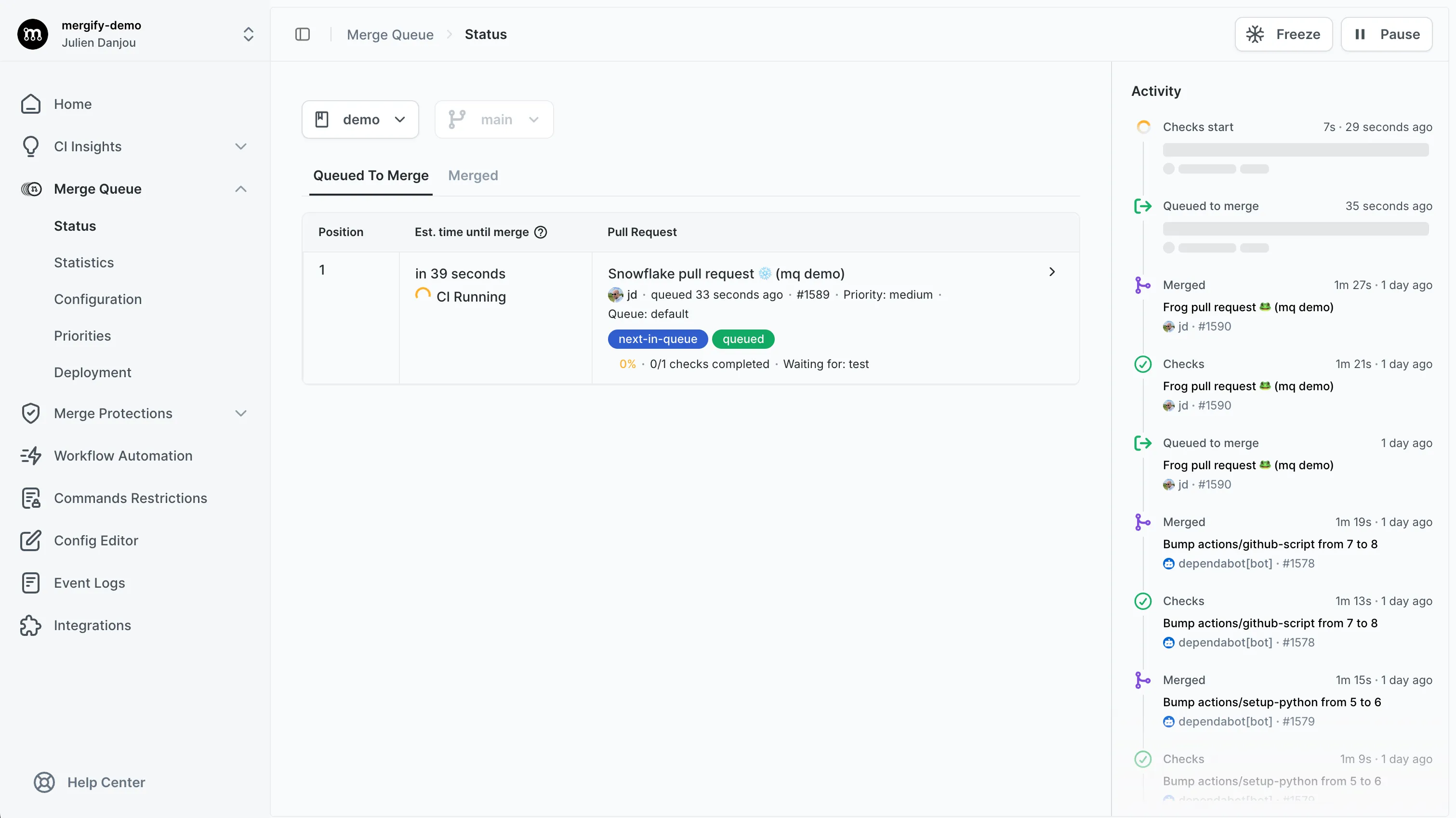
- Check the Mergify checks tab on the PR: On each pull request page, the “checks” tab will show the status of the Mergify checks. If the pull request is in the queue, you will see a “Mergify — Queued” status.
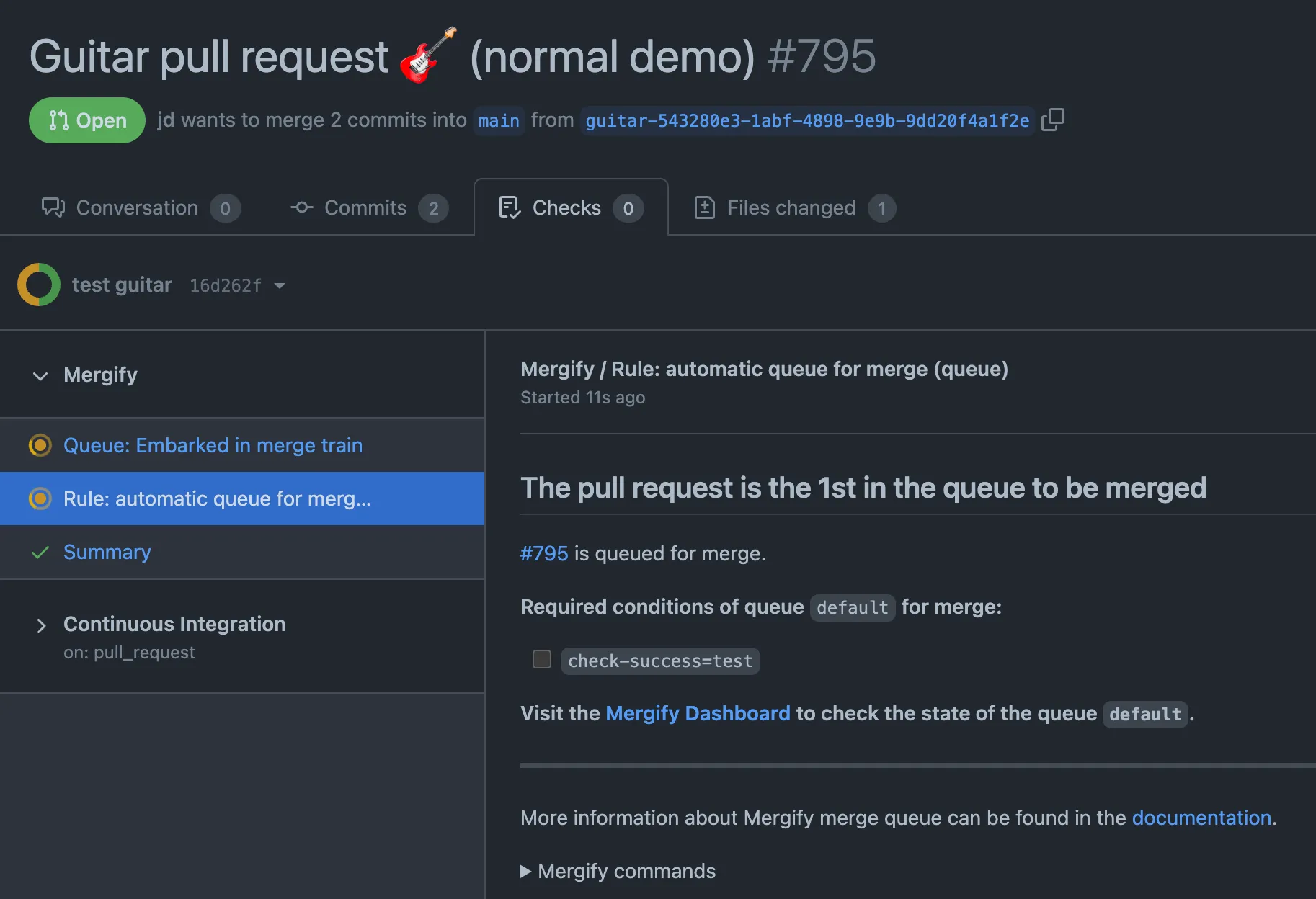
Monitoring your pull requests’ status helps you understand their position in the queue and estimate when they might be merged, making the entire process more transparent and manageable.
Was this page helpful?
Thanks for your feedback!